


Last week, we laid the foundation and explored how we use LLMs as the backbone of our AI strategy. This week, we're moving into the creative side: the AI tools that power our marketing and design output. From image generation to video, social media to presentations, here's what actually works, what doesn't, and where we've wasted money so you don't have to.
Image Generation: From Six-Fingered Hands to Genuine Utility
I still remember the excitement of discovering AI image generation back around 2021. Midjourney was leading the charge, and the concept felt genuinely magical. Type a prompt, and an image materialises from nothing. It was one of those moments where the future felt like it had arrived early.

But those early models, while impressive in concept, were riddled with anomalies. People with six fingers were practically a trademark. Anything with visual complexity, whether zebra crossings, architectural details or crowds, would produce surreal, often unusable results. And text? Forget it. Text rendering has been the single most persistent weakness in AI image generation. Even today, if you wander around a local market or garden centre, you’ll spot AI-generated posters for sale where the text is pure nonsense. It’s become something of an unintentional watermark for the technology.
So where are we now?
Midjourney remains an exceptional tool. There are also lots more providers today Ideogram, Fireflies (by Adobe), Recraft and Leonardo.ai to name but a very few. The quality ceiling is high, and if you’re skilled at prompting, you can produce stunning results. But there’s a practical reality: the standard plan runs at $200 - $300 per year. Prompting is still very much a skill, and images often need iteration and refinement.
While it’s incredibly useful to create a bespoke image for a specific use case, the truth is that requirement doesn’t come up as often as you’d think. Not for us, anyway.
So today, we’ve largely come back to earth. Stock imagery from Unsplash handles the bulk of our needs, and for AI-generated images, we use Google’s Nano Banana, which comes bundled with our Gemini subscription.
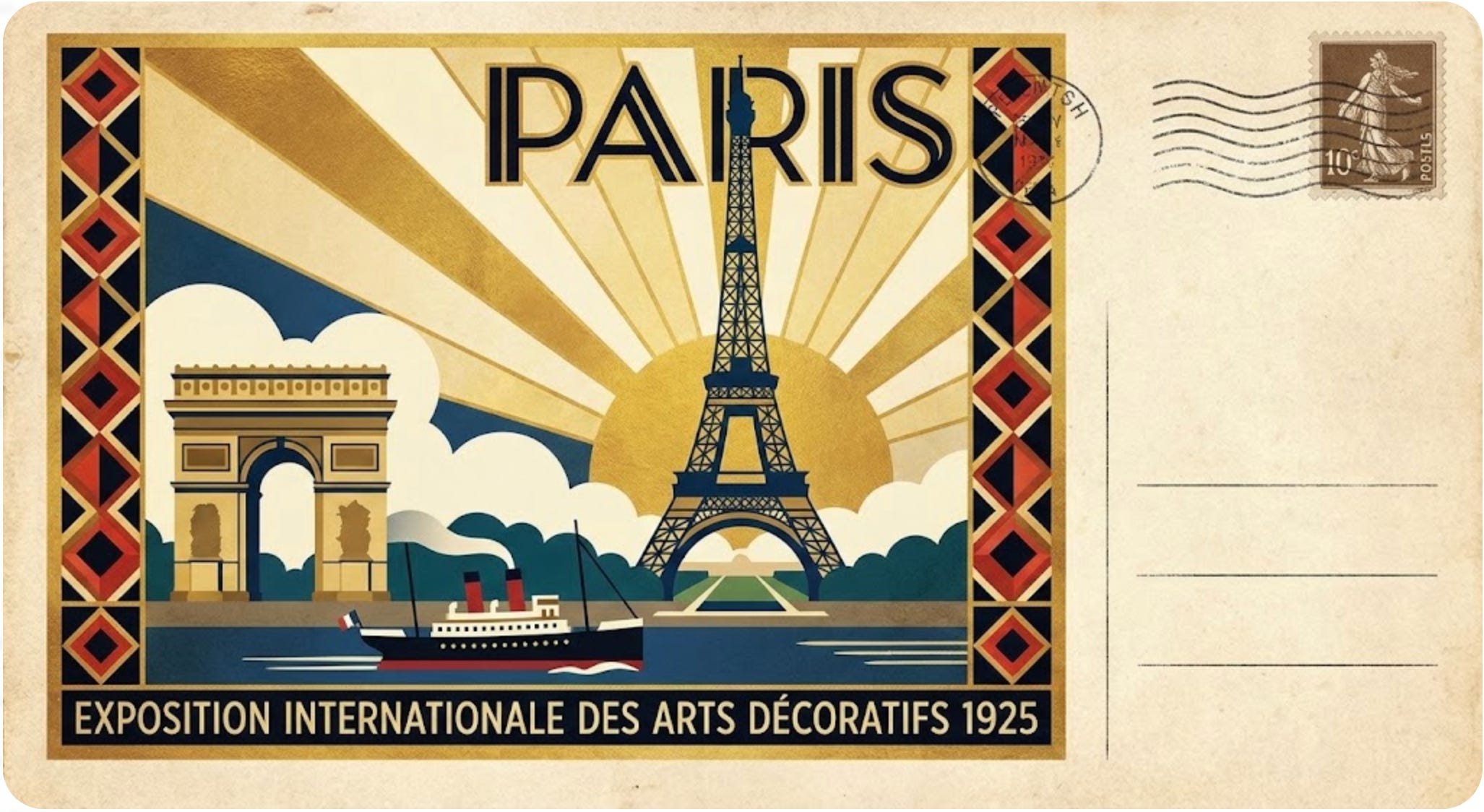
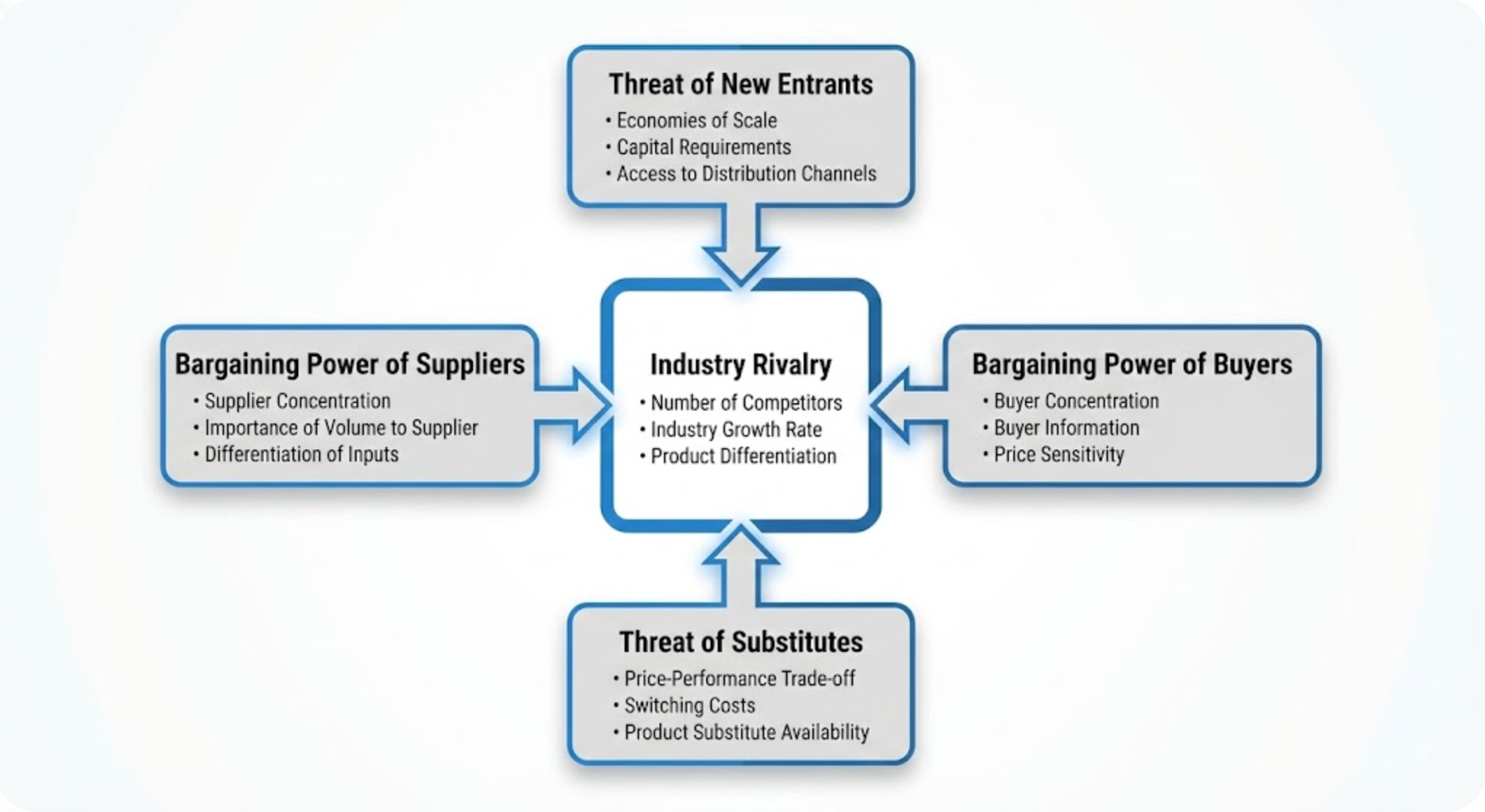
Nano Banana deserves a proper shout-out here. It’s an incredible tool that is relatively new on the scene. Its image editing capabilities are superb. You can take a product shot and swap the background while preserving brand integrity. Its ability to create business schematics that clearly communicate concepts and processes is outstanding. And critically, its text handling is excellent, one of the areas where so many other tools still fall short. For our day-to-day needs, Nano Banana covers everything. (Note Grok and OpenAI also have very capable image generation capabilities - Grok’s model is lightening fast.)
For that remaining one per cent of cases, the truly unique images that neither stock photography nor Nano Banana can deliver, we run a local LLM setup. It’s a bit more involved to configure, and you have to build workflows for the different models, but the key advantage is straightforward: it’s free. No subscription, no per-image cost. For those rare occasions, it’s well worth having in the toolkit.
The bottom line on image generation: you don’t need to spend $200-$300 a year on unless bespoke, high-end image creation is a core part of your workflow, which for bigger marketing teams may be true. A Gemini subscription with Nano Banana, supplemented by stock imagery and a local LLM for edge cases, covers the vast majority of business needs at a fraction of the cost.
Video Generation: Where AI Delivers Real Business Value
Video is the area where AI arguably brings the most tangible new value to the marketing stack. Before AI video generation existed, your options were limited and expensive. Stock video sites charge premium rates for footage, and if your content involves anything niche or licensed, costs escalate rapidly. Try sourcing Formula One footage and watch your budget evaporate.
This is where AI-generated video genuinely comes into its own. The results aren’t perfect, and as with everything in this space, your ability to prompt effectively directly determines the quality of your output. Our Lighthouse logo, getting an animated lighthouse beam is truly hit and miss. There’s research involved, and you need to understand the strengths and limitations of the platform you’re working with.
But for us, in terms of real business value, the primary use case is clear: creating specific scenes for B-roll footage in marketing and promotional videos. This is genuinely powerful. Instead of spending hours trawling stock sites trying to find footage that approximates what you need, you can generate exactly the scene you’re looking for. The time savings alone make it worthwhile.
That said, context matters. If you need generic footage of people in a meeting room, a stock site is probably quicker and easier. But when you need something specific, a particular setting, action or mood, AI generation is the way forward.
We’ve tried most of the major platforms over the years, including Runway ML, Kling, PikaLabs, Domio, Sora (OpenAI) and several others. Where we’ve settled, and where we’re getting the most consistent results, is Google’s Veo 3. The platform delivers remarkably reliable output. What you prompt is very close to what you get, without the strange anomalies that plague other tools. Character consistency across scenes, historically one of the biggest challenges in AI video where maintaining the same character across multiple ten-second clips felt nearly impossible, has been largely solved. Veo 3 handles it well.
I’d like to try Sora 2 from OpenAI, but at the time of writing, it’s not available in the UK. Something to revisit. I know what I said about Grok as an LLM last week, but its probably our #2 go to AI for image and video, the Lighthouse Video was made with Grok - it’s lightening fast, provides variations and has beeter limits - we have it through our X (e.g twitter).
There are limitations the videos are 8 - 12s depending on who you use, getting consistency across multiple videos - e.g. lets image you want to make an 30 second advert is still challenging (but getting better), and you are still charged for videos that arent usable - so planning is needed. I used our limits for the next few hours trying to create a couple of example clips.
There are aggregator platforms out there that bundle multiple AI video tools together. We’ve looked at these, but the cost of the tokens is opaque and prohibitive for our use case. Instead, we stick with Veo 3 through our existing Google subscription, which means we get Gemini, Nano Banana and Veo 3 as a combined package. That’s an extremely powerful creative stack working in concert, and it’s cost-effective because we’re leveraging a subscription we’re already paying for rather than lighting up additional tools.
Voice Generation & Talking Heads: Where AI Breaks the Mould
This is the section where AI stops being a helpful productivity tool and starts genuinely changing how content is created. Voice generation and talking head videos represent a shift from traditional marketing formats into proper multimedia content, and the results are, frankly, game changing.
Voice Generation
Let’s start with voice. The clear leader in this space is ElevenLabs, and they’ve earned that position. The quality of their voice synthesis is remarkable, the product keeps getting better, but the feature that sets them apart is voice cloning. You can train the model on your own voice and create a genuinely realistic digital twin. I did it with a two-hour voice sample (recorded incrementally over a few days), and the results were impressive from the start. What’s particularly striking is that the clone gets stronger and more natural the more you use it. It learns the nuances, the cadence, the way you naturally emphasise certain words.
Beyond single-voice quality, ElevenLabs handles multi-speaker content brilliantly. You can have two people talking at once, which opens up enormous creative possibilities. If you’re producing content that would traditionally require getting multiple people into a studio, whether that’s a conversation, an interview format or a panel discussion, you can now generate that with AI voices. The time and cost savings are significant.
There are other solid tools in this space. We’ve also used Murf AI, which produces good results. But we’ve settled on ElevenLabs as our default. It’s a key part of the stack.
Talking Head Videos
Now take that voice and marry it with a talking head video generator, and you’ve got something truly powerful.
There are several platforms in this space. Synthesia is well known, particularly for product demos and corporate training content. Hedra is another option worth exploring. But the one we use most, and the one that’s delivered the best results for us, is HeyGen.
HeyGen offers two approaches. You can use a digital avatar, essentially a made-up person that looks and moves realistically. This works well for content where you don’t need a recognisable face. But where it gets really exciting is their person clone feature. You record a short video of yourself, roughly three minutes, and HeyGen creates a digital version of you that’s remarkably accurate. The example below isnt perfect and took two minutes to make, but gives you an idea.
For someone like me, this is transformative. I’m terrible at outtakes. Every time I sit down to record a one-minute video, it takes twenty minutes because I stumble over words, lose my train of thought or just can’t get the delivery right. The idea that I can now use my own cloned voice from ElevenLabs paired with a realistic avatar of myself from HeyGen is fantastic. The content looks and sounds like me, but without the frustration of endless retakes.
This is where AI is genuinely breaking the mould. We’re moving beyond the traditional marketing toolkit of static images, PowerPoint decks and social media graphics into proper multimedia content creation. The combination of AI voice cloning and talking head generation means a small team, or even a solo operator, can produce video content that would previously have required a studio, a camera crew and a budget to match. That’s not incremental improvement. That’s a fundamental shift in what’s possible.
Social Media: The One Area Where AI Has Let Us Down
Here’s where I have to be candid: we haven’t cracked this one. We’ve genuinely tried to find an AI tool that creates on-brand, differentiated social media posts (e.g we’ve tried Predis.ai, Buffer). And every time, we’ve ended up cancelling within 24 hours of the trial.
The problems are consistent across platforms. The templates are homogeneous, with every post following the same structure with the same style of graphic, every time. There’s no variation, no ability to create content that actually stands out in a feed. The text is difficult to control. And once you strip away the AI-generated content (which you end up replacing anyway), what you’re left with is essentially a very expensive scheduling engine.
We’ve accepted the reality: AI hasn’t solved social media content creation yet. Not for businesses that care about differentiation and brand quality, at least.
So we’ve reverted to what we’ve used since day one: Canva.
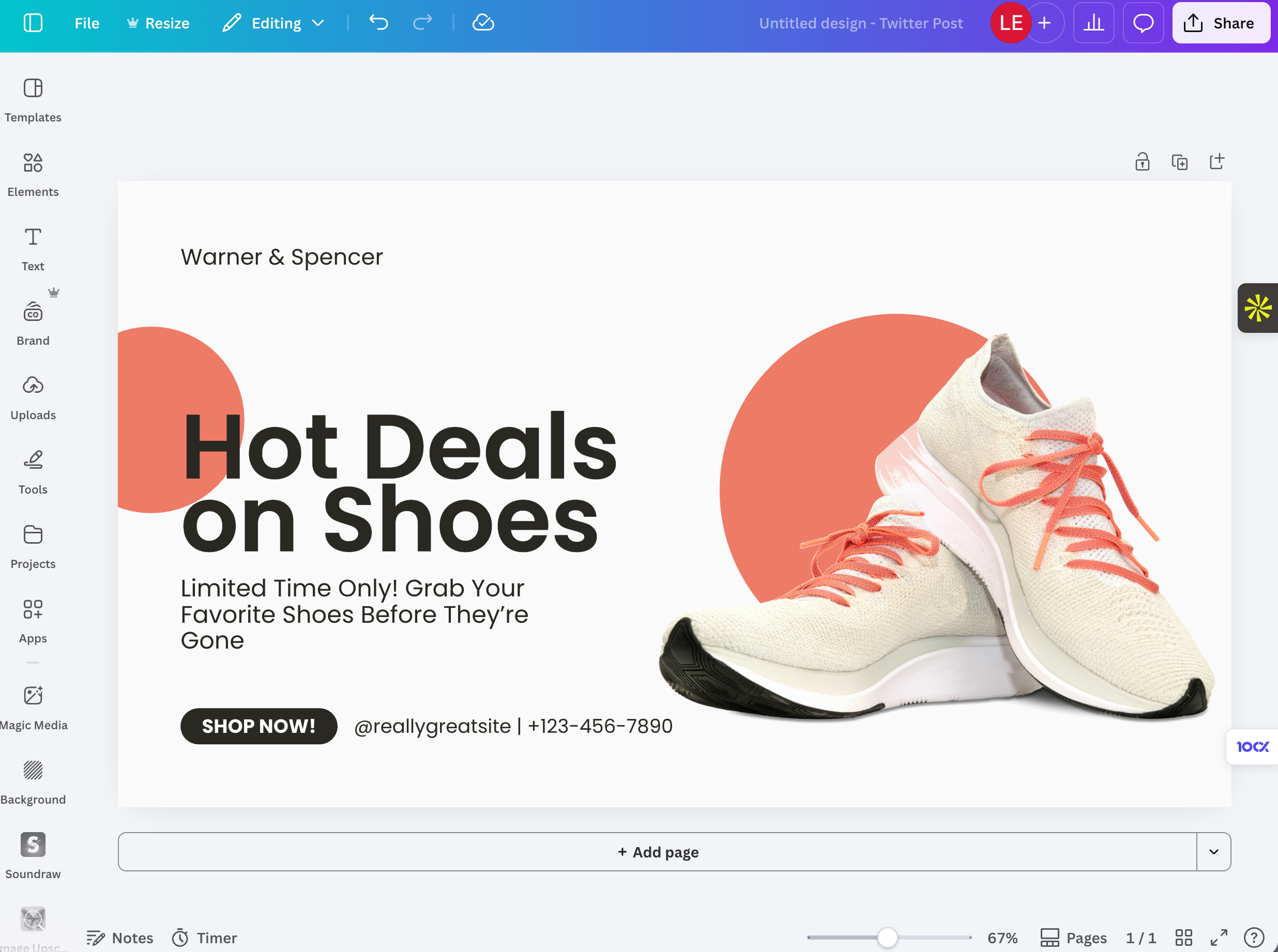
Canva is an exceptional package, and over the years they’ve built in some genuinely powerful AI capabilities of their own. Here’s why it works:
Their template library is extraordinary, not just in volume but in quality and variety. You can create visually stunning social media content quickly, without needing a design background. The UI is so easy to use. The AI features within Canva let you push designs further through prompting, taking a strong template to the next level. And critically, they’ve built in the scheduling and posting capabilities, so your entire social media workflow from creation through to publication lives in one place.
The subscription cost, compared to the dedicated AI social media tools we’ve tried, is dramatically more competitive. That’s the takeaway from our experience: the specialist AI tools overpromise and underdeliver, while Canva, which doesn’t position itself primarily as an AI tool, delivers more practical value - canva is the gold standard and the one to beat.
Presentations: A Story of Frustration Turning to Progress
The final piece of our marketing stack is presentations, and this one has a nuanced story.
First, some context on how we actually use PowerPoint: it’s more document than presentation. We rarely stand up and present slides in the traditional sense. Instead, we deliver PowerPoint reports. It’s how we package and deliver content to clients. We have established templates, and most of the time, we’re not looking for AI to create the final deck. What we need is help getting past the blank page. What layout works, how can we present this concept in a visually engaging way? How do we make this look good within our brand guidelines? We’re always hunting for arrangements and styles that feel visually attractive and give the brand a premium feel.
And here, similar to social media, AI has been genuinely poor to date on the design element. You can use it, but the output just isn’t attractive enough. We’ve bought packages, trialled them and cancelled them almost overnight. The designs are repetitive, undifferentiated, and nothing stands out. Tools like Gamma and others in that category have all followed the same pattern for us.
Where we’ve landed as a default starting point, and this connects back to last week’s article, is Google NotebookLM. It has limitations, primarily that it only produces PDFs. But they’re addressing that, and I believe a recent release now allows export to PowerPoint, which would be significant. We can’t necessarily use NotebookLM output as a final client-facing deck, but the content it generates is so engaging and well-structured that it’s become our go-to for getting ideas and initial structure down.
The real game changer in this space, and this has only become available in 2026, is Claude’s PowerPoint plugin. This is where things get genuinely exciting. We can work in a deck that already contains our template slides, feed Claude the content, and it will take a first pass at building the slides using our template, our brand guidelines and the source material. It’s not perfect and there’s reformatting involved, but it’s considerably better than any of the commercial AI presentation packages we’ve tried. The difference is that it works with your existing brand assets rather than imposing generic templates.
And then there’s Canva again. For creating a standout presentation from scratch, one that needs to look absolutely fantastic, Canva remains brilliant. Just as with social media, it’s the reliable, high-quality option that keeps earning its place in our stack.
Where This Is All Heading
Looking across all five of these areas, a pattern emerges. AI is starting to make inroads into graphic design and layout, but for now the real value is coming from two directions. First, the major platform subscriptions (including OpenAI and Grok): For us it is Google’s ecosystem giving us Gemini, Nano Banana and Veo 3 in one package, plus Anthropic’s Claude with its PowerPoint integration. Second, the established creative tools like Canva, ElevenLabs and Heygen that have thoughtfully integrated AI capabilities into an already excellent product.
I think much of this is heading towards commodity. Image generation is already being squeezed as every major LLM adds the capability natively. Video generation still has room, as there’s a whole creative industry there with genuine complexity to solve. But for social media and presentations, I think the large LLM providers will eventually make it very difficult for independent tools to compete.
The practical advice? Before you subscribe to the next shiny AI marketing tool, look at what you’re already paying for. The answer might already be in your existing stack.
Next week: In the final part - we’ll look at the productivity tools we use, included in that are Agents, Coding tools and automation tools.