


Last week, a single product update wiped $285 billion off the stock market. Not a new chip. Not a breakthrough model. A set of plugins for a tool most executives have never heard of. Here's why you should be paying attention.

If you’ve been following AI.Proof, you know we don’t do hype. We test tools, evaluate the hype vs the reality and tell you what actually works for getting things done in a business. So when we say that Anthropic’s Claude Cowork might be the most practically useful AI product we’ve seen in 2026, we mean it.
Not because it’s clever. Because it’s useful. Properly, boringly, get-the-job-done useful.
What Is Cowork, and Why Should You Care?
Claude Cowork is best understood as "Claude Code for everyone else." Claude Code, launched earlier last year, allowed software developers to delegate coding tasks to an AI agent that could plan, execute and debug across multiple files. Cowork applies the same agentic architecture to general business work.
Let’s start with what it isn’t. It isn’t another chatbot. It isn’t another “ask me anything” text box. And it isn’t another demo that looks brilliant on stage but falls apart when you try to use it with real files and real deadlines.
Cowork is a new mode inside the Claude Desktop app (macOS for now) that gives Claude direct access to a folder on your computer. You point it at your files, describe what you need done, and it gets on with it. It reads documents. It creates spreadsheets with working formulas. It builds PowerPoint decks. It organises, renames, analyses, and produces finished work product.
Cowork is an AI agent built by Anthropic that works directly with the files and folders on your computer. Think of it less like talking to an assistant and more like leaving a brief for a competent colleague who happens to work incredibly fast.
The tool launched on 12 January 2026 as a “research preview” for Claude Max subscribers, and has since expanded to everyone. It’s built on the same architecture as Claude Code, which has been Anthropic’s breakout hit with developers since late 2024. The crucial difference is that Cowork wraps all that capability in an interface that doesn’t require you to open a terminal or write a single line of code.
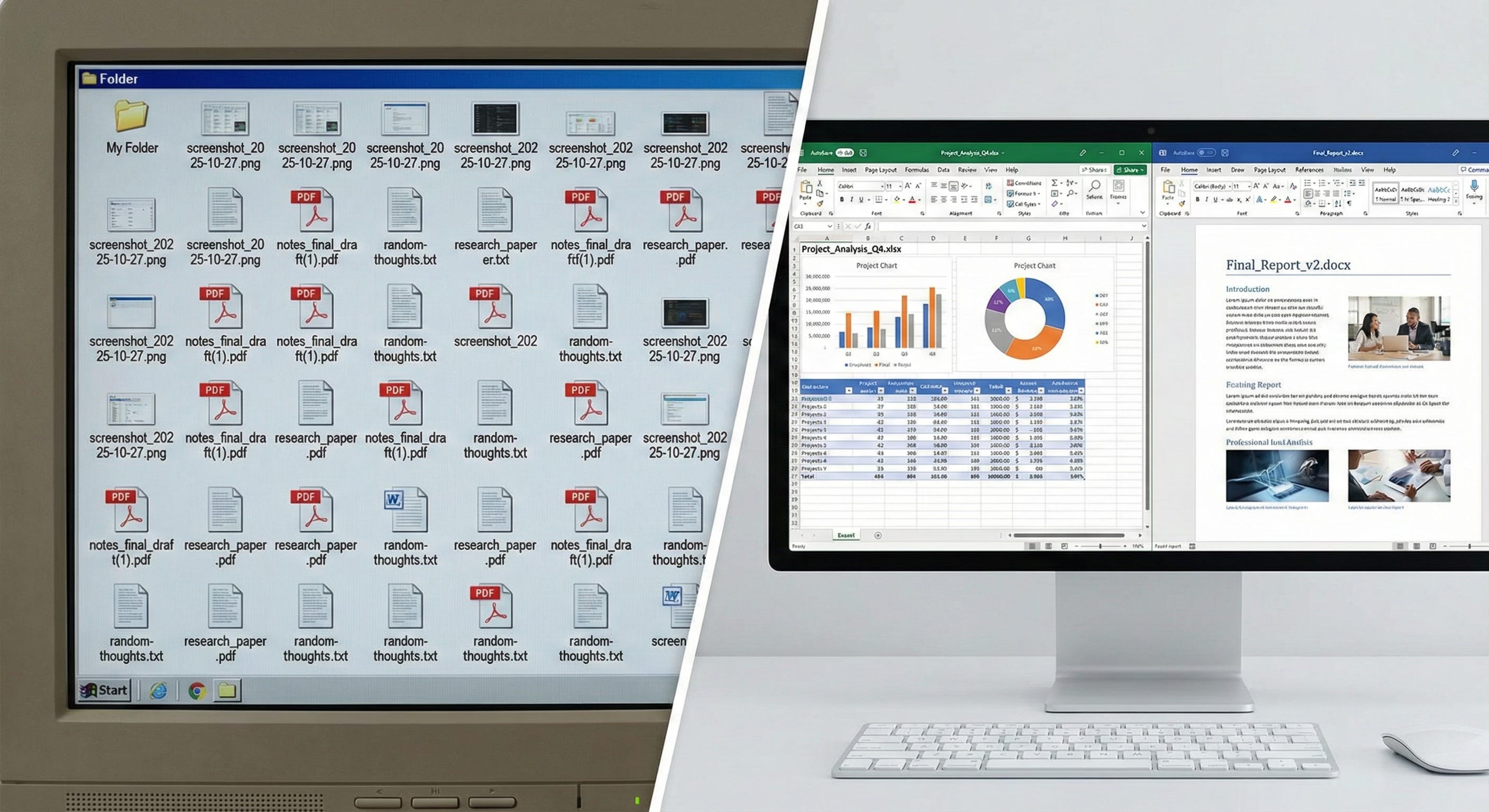
Cowork turns unstructured inputs into polished business outputs without manual formatting.
What It Actually Does
Here’s where it gets interesting for anyone running a business or managing a team.
Cowork doesn’t just suggest what you could do. It does the work. Point it at a folder of receipt photos and ask for an expense report. You’ll get back a formatted Excel spreadsheet with categories, totals, and working formulas. Give it a pile of research notes and ask for a board paper. You’ll get a Word document with proper headings, structure, and citations.
The built-in “skills” handle the file formats most businesses live in: .xlsx, .pptx, .docx, and .pdf. These aren’t basic exports. The Excel files come with VLOOKUP formulas, conditional formatting, and multiple tabs. The PowerPoint decks read your existing templates and match your fonts and layouts. The PDFs can be merged, split, or have forms filled in.
You can also queue up multiple tasks and let Cowork run through them in parallel. It plans its approach, keeps you updated on progress, and asks for clarification when it needs it. If you’ve ever left a decent brief for a junior analyst and come back to find the work done, that’s the experience they’re aiming for.
Critically, you can build custom plugins using the "Plugin Creator" tool. This allows organisations to encode their own standard operating procedures into reusable skills that any authorised team member can deploy. For enterprises, this promises to capture institutional knowledge that typically walks out the door when experienced staff leave.
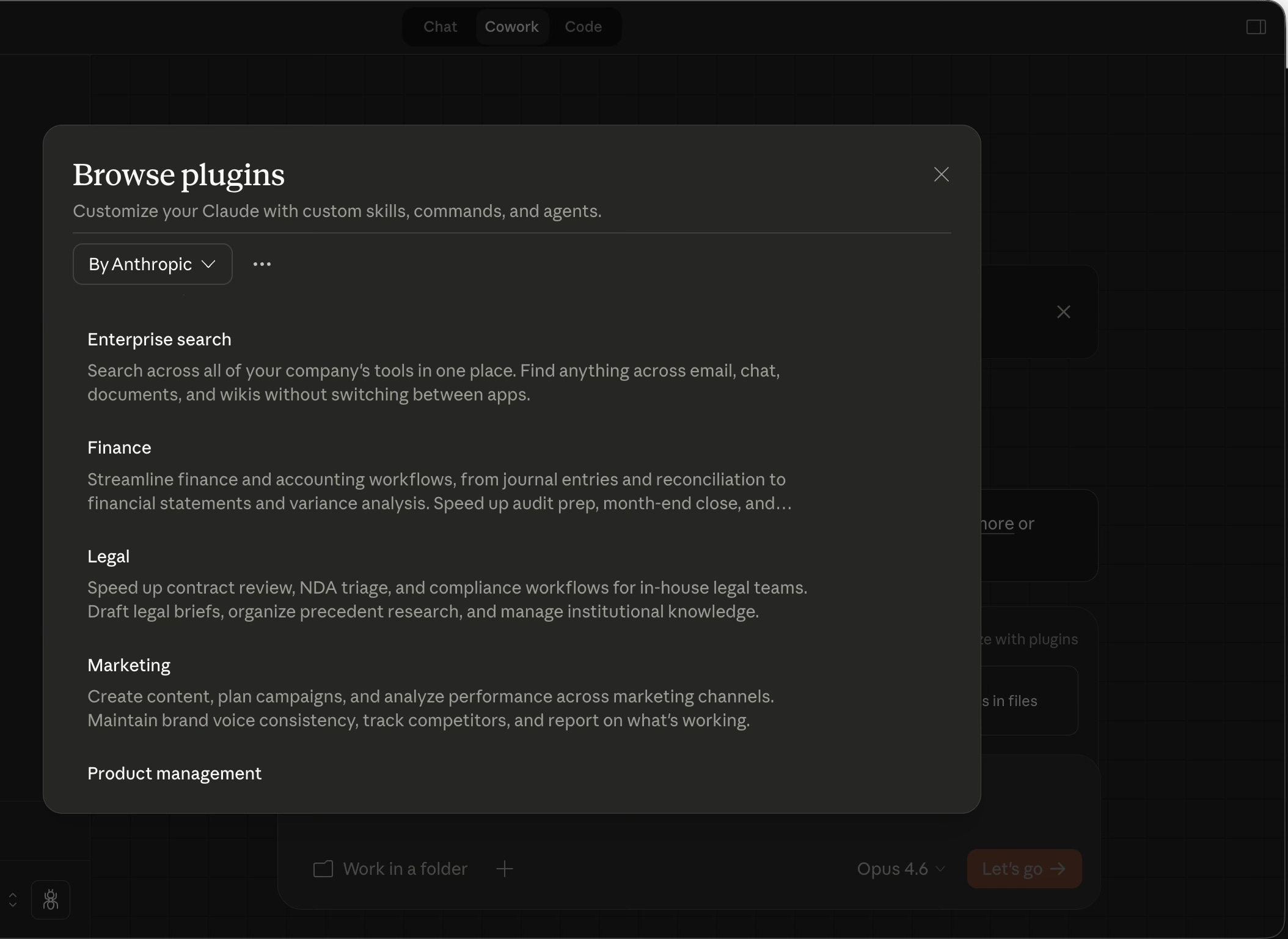
Eleven open-source plugins cover every major business function, and you can build custom ones using the Plugin Create tool.
The Stock Market Reaction
Here’s where the story gets dramatic. When those plugins dropped, investors took one look at the implications and started selling.
Thomson Reuters fell 15.8% on the Tuesday. LegalZoom dropped nearly 20%. RELX, the parent company of LexisNexis, saw double-digit declines. FactSet Research Systems dropped 10%. Salesforce and Workday both took significant hits. The Goldman Sachs software basket fell 6%, and the Nasdaq had its worst two-day tumble since April.
The fear wasn’t irrational. When an AI tool can review contracts, build financial models, prepare competitive briefs, and produce formatted reports, it starts to overlap with a very large number of enterprise software products that charge substantial subscription fees to do those same things.
As Dan Ives at Wedbush noted, scaling these tools across large enterprises with thousands of employees and entrenched processes isn’t something that happens overnight. And Gartner analysts wrote that predictions of the death of SaaS are “premature.” But the direction of travel was clear enough to shake markets worldwide, including significant drops across Indian IT outsourcing stocks.
The timing got worse for incumbents when Anthropic followed up on 5 February with Claude Opus 4.6, a new model with a million-token context window (roughly the equivalent of being able to read and process several thousand pages at once), plus the ability to coordinate teams of AI agents working in parallel. Software stocks took another leg down.
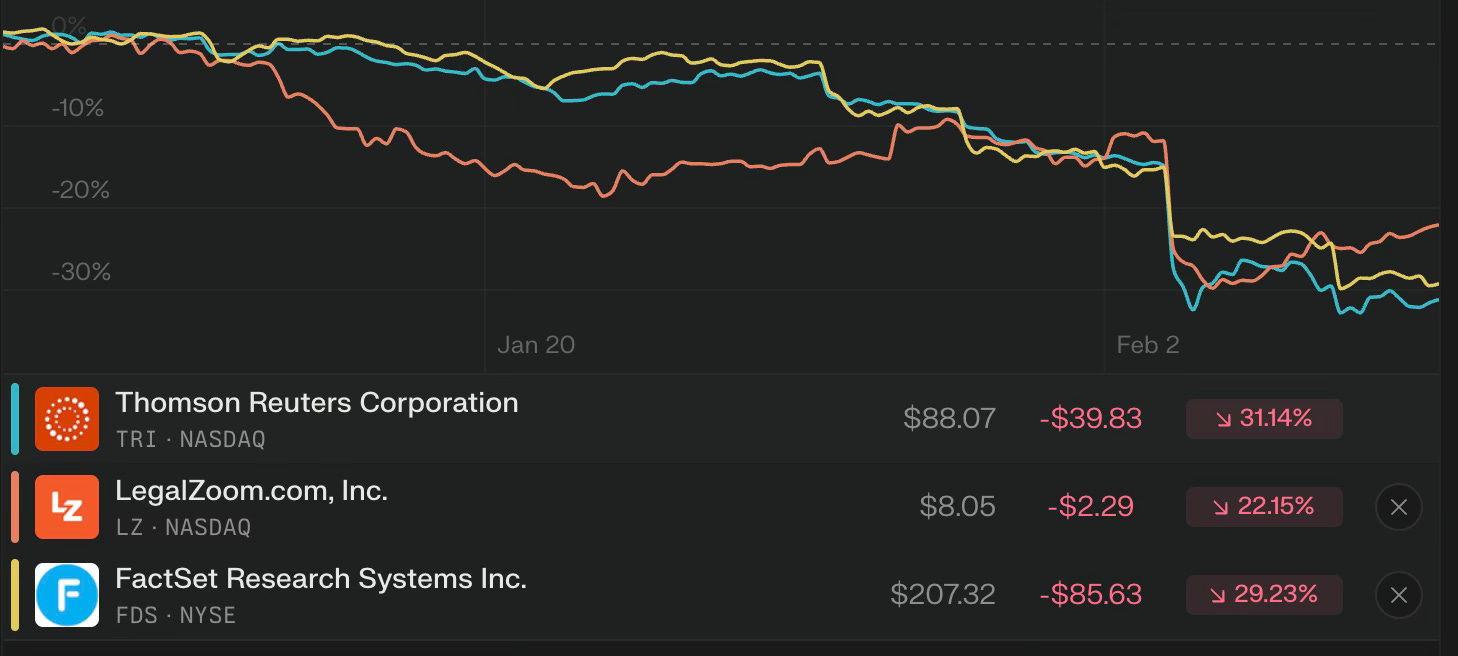
The ‘SaaSpocalypse’: Software stocks cratered after Anthropic’s plugin launch on 30 January.”
How It Was Built (And Why That Matters)
Here’s a detail that says more about where we are with AI than any benchmark score. According to Boris Cherny, the inventor of Claude Code, Cowork was built using Claude Code itself. Product Manager Felix Rieseberg confirmed the app came together in roughly a sprint and a half, about one and a half weeks.
Read that again. Anthropic used its own AI coding tool to build a new product in under two weeks. The team had done some prototyping and exploration beforehand, and the current release still has rough edges. But the core product was assembled by the same AI agent technology it’s now packaging for everyone else.
This is what “eating your own cooking” looks like in 2026. And it’s a powerful signal about what these tools can do when pointed at real work.
Practical Use Cases for Your Business
We’ve been testing Cowork at Lighthouse, and here are the scenarios where it delivers clear value today:
Sales Operations: Before a client meeting, a salesperson can instruct Cowork to review the prospect’s website, analyse previous email threads stored locally and compile a briefing document with talking points tailored to the specific opportunity.
Legal Operations: Rather than paying external counsel to review standard NDAs, an in-house team can route contracts through Cowork’s legal plugin. The tool flags unusual indemnity clauses or jurisdiction issues, allowing senior lawyers to focus on negotiation rather than first-pass review. It doesn’t replace the need for legal expertise but for more commodity documents like NDA’s it’s very useful.
Meeting and interview analysis. Drop a batch of meeting notes into a folder. Cowork will extract themes, key quotes, action items, and areas of consensus or disagreement across the full set. While this use case isn’t new, it’s another subscription you don’t need, just record audio of meetings and the analysis and actions is covered.
Expense and receipt processing. Photograph your receipts, drop them in a folder, and Cowork produces a categorised expense spreadsheet with totals and breakdowns. It handles the OCR, the categorisation, and the formatting in one pass.
Competitive research. Pair Cowork with Claude in Chrome (the browser extension) and it can research competitors online, then compile findings into a formatted document or presentation, all without you manually copying information between tabs and documents.
Report and presentation production. Give it an outline and supporting data. Get back a formatted Word document or PowerPoint deck. The outputs aren’t perfect every time, but they’re a dramatically better starting point than a blank page.
What You Need to Know Before You Start
A few practical considerations.
Availability. Cowork is currently macOS only via the Claude Desktop app. The plugins are free and open-source on GitHub.
Security. Cowork runs in a sandboxed environment. It can only access the specific folder you grant it permission to. It asks before taking significant actions. That said, Anthropic is upfront that it can take destructive actions (like deleting files) if instructed to, so keep backups of anything important and be specific in your instructions.
Limitations. It’s a research preview, which means there are rough edges. It’s built for local files, so cloud-first teams using Google Workspace will need to sync files locally. And while the plugins are described as “no-code,” customising them for your specific workflows does involve editing some JSON and markdown files.
The opportunity cost of waiting. This is still early. The teams and businesses who start experimenting now will have a meaningful head start when these tools mature. You don’t need to rebuild your entire operation. Start with one repetitive task, one folder of messy files, one report that takes too long to produce. See what happens.
The Value Creation: Beyond the Hype
The stock market reaction to Cowork wasn’t just about one product from one company. It was a recognition that the gap between “AI can chat about your work” and “AI can do your work” just got a lot smaller.
Strip away the market hysteria and you are left with a practical reality. Claude Cowork offers something that has been promised for decades but rarely delivered: the elimination of mundane work without requiring technical expertise.
For businesses, the immediate value lies in time reclamation. Knowledge workers spend approximately twenty per cent of their week on administrative tasks: formatting documents, reorganising files, transferring data between formats, compiling reports from scattered sources. Cowork appears capable of handling significant portions of this workload, not by replacing the human judgment but by executing the mechanical implementation.
The second value lies in standardisation. When junior staff create spreadsheets or presentations, quality varies. When an AI agent applies the same skill template each time, output becomes consistent. This reduces error rates and ensures compliance with internal standards without requiring exhaustive training.
Third, there is the democratisation of automation. Previously, automating a workflow required either expensive software engineers or expensive enterprise software licences. Cowork allows non-technical professionals to automate their own repetitive tasks through conversation. A finance director who cannot write Python can nonetheless instruct Cowork to build a complex financial model.
Cowork won’t replace your legal team, your analysts, or your consultants. But it will level them up and change what you need them to spend their time on. The mundane, repetitive, format-and-compile work that eats up hours every week? That’s exactly what tools like this are built for.
And unlike most of what passes for AI strategy advice, this isn’t theoretical. You can download it today, point it at a folder, and see for yourself.
That’s the AI.Proof approach. Less hype. More doing.